Builder
Create a scenario from a template
Templates are read-only sources, separate from Workspace scenarios. The catalog is public; creating a scenario from a template requires the scenario_templates plan feature. The plan alone decides: guests are served by the Starter plan, which has no templates, so they receive 403. Basic and Premium include templates:
| Method and path | Result |
|---|---|
GET builder/templates/ |
Available templates with IDs, descriptions, locations, attribution and duration limits. |
GET builder/templates/{template_id}/ |
Details of one template, including its WGS84 bounding box, provenance, duration and supported simulation settings. |
POST builder/templates/{template_id}/instantiate/ |
Start creating an independent scenario owned by the caller. |
Template responses include a short description, a bounding_box with west, south, east and north WGS84 coordinates, the primary key as id, duration_seconds for the full source duration and max_duration_seconds for the lower of that duration and the current plan limit. begin_seconds retains the source's simulation start. Template IDs are not workspace scenario IDs.
| Create scenario request | |
|---|---|
All fields are optional: the name defaults to the template name, the comment to an empty string and the project to none. Omit duration to use max_duration_seconds; an explicit duration must be positive and within that limit. project_id must refer to a project owned by the caller and requires the Projects feature (403 if the plan lacks projects, 401 if the plan has them but the caller is a guest, 404 if the project does not exist or belongs to someone else); null, 0 and -1 select the Workspace. Every copy consumes one scenario creation of the shared rolling 24-hour quota (together with custom builds and ZIP uploads); 402 is returned when it is exhausted. Template area is exempt from the Builder area limit. See Errors and limits for all status codes.
The response contains result_id and status_url. Poll the returned builder/create-scenario-status/{result_id}/ URL until state is SUCCESS or FAILURE. A successful result contains the new scenario_id and scenario_name. Use that ID with the ordinary Workspace, Editor and Simulator APIs. Creating a copy does not start a simulation. Repeating a successful request creates another independent scenario.
Existing copies keep their files, duration and attribution when a template changes or disappears. Plan downgrades follow ordinary workspace behavior: existing scenario duration is not checked again against the new plan. The former builtin list/detail and direct-simulation endpoints have been removed without compatibility aliases.
Upload custom scenario from zip archive
The builder/upload-scenario endpoint uploads a custom scenario from a zip archive into the Workspace, making it available for further editing or simulation.
The upload is performed using a multipart/form-data request, where the zip archive and scenario metadata are sent together. After the upload, a background task is started to process the uploaded data.
Once the request is successfully submitted, the API returns a status_url, which allows clients to track the progress of the upload.
When the processing is complete, the scenario is available in the workspace for further use.
Constraints for zip archives:
- The zip archive may contain the scenario files directly or inside exactly one root folder. Mixed root files and folders or multiple root folders are rejected.
- The scenario must contain exactly one SUMO configuration (
.sumocfg) file. - The uploaded scenario can only contain SUMO-related scenario files with the following allowed extensions:
.bat, .diff, .duarcfg, .gz, .md, .netccfg, .polycfg, .rtcfg, .sh, .sumocfg, .txt, .xml
Any zip archive containing unsupported files or an unsupported folder layout is rejected by the API.
The upload requires the scenario_custom_uploads plan feature (403 otherwise; the Starter plan used by guests does not include it) and the compressed archive must not exceed the custom_upload_max_bytes limit of the plan. Each upload consumes one scenario creation of the shared rolling 24-hour quota (402 when exhausted).
The archive is extracted safely in the runner (src/runner/runner/tools/archive.py). Archives are rejected, and the task ends with a user-readable failure message, if they contain absolute or .. paths or symbolic links, more than 100,000 entries, a single file larger than 1 GiB uncompressed, more than 2 GiB uncompressed in total, or large files with a compression ratio above 200:1 (decompression bombs). Nested archives are never extracted.
sequenceDiagram
    participant C as Client
    participant S as SESAM API
    Note over C,S: Upload scenario as zip archive
    C->>+S: POST builder/upload-scenario (multipart)
    S->>-C: status_url for task status
    loop until state == "SUCCESS"
        C->>+S: GET status_url
        S->>-C: { ... state, scenario_id, ...}
end
Here is an example python code for uploading a zip archive of a scenario to SESAM.
Make sure to set the Content-Type of the request to multipart/form-data and not to application/json.
If you want to use an API tool, such as RapidAPI, please confer to the following image to see how the request can be configured.
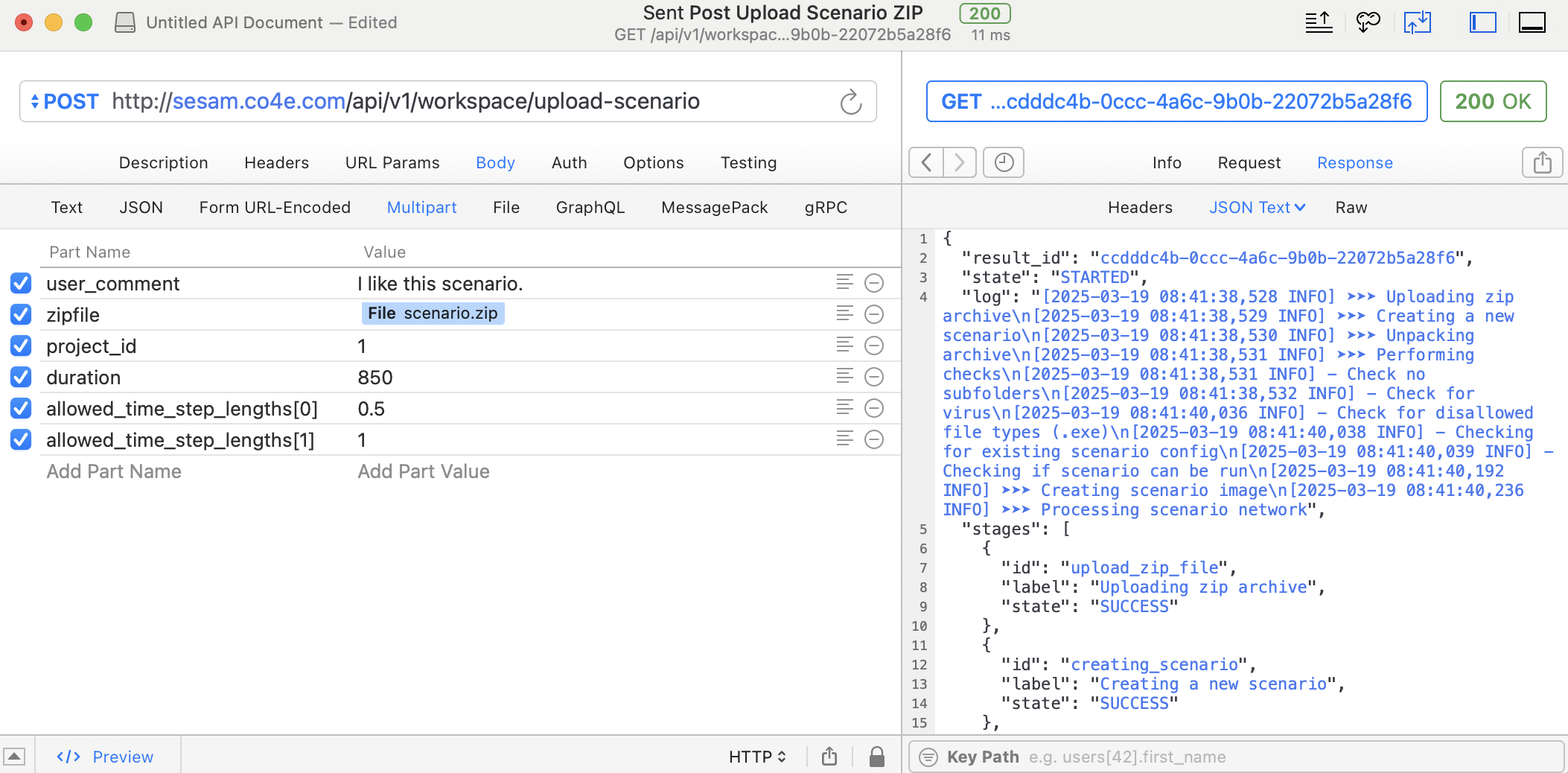
Please note, how multiple values for allowed_time_step_lengths are supplied as multiple parts in the request (see allowed_time_step_length[0] and allowed_time_step_length[1] in the screenshot) to be properly recognized by the API.
The file content can be added by creating the zipfile part in the request, followed by a right click in the value field and then selecting File and File Content.
This allows to browse the local computer for the zip archive with the scenario to be uploaded.
Create custom scenario
The builder/create-scenario endpoint creates and stores a custom scenario in the current user's Workspace.
It functions similarly to the workspace/scenario-zip or workspace/simulation-run-zip endpoints.
Once an access token has been successfully obtained via login, the builder/create-scenario endpoint can be employed to initiate a task for creating a new scenario.
A json dictionary must be supplied via a POST request to specify scenario parameters such as location, background traffic characteristics or custom traffic flow definitions. The schema definition outlines the list of possible parameters for this dictionary.
The status of the background task can be tracked with the status url, that will be provided as part of the response of the builder/create-scenario endpoint.
Each request consumes one scenario creation of the shared rolling 24-hour quota. A scenario duration or area above the limits of the plan, or an exhausted quota, is answered with 402. An optional project_id follows the same rules as for templates. See Errors and limits.
sequenceDiagram
    participant C as Client
    participant S as SESAM API
    Note over C,S: Login to retrieve token
    C->>+S: Login (username, password)
    S->>-C: Token

    Note over C,S: Create custom scenario
    C->>+S: POST builder/create-scenario(...)
    S->>-C: status_url
    loop until state == SUCCESS
        C->>+S: GET status_url
        S->>-C: log, state, scenario_id, ...
    end
Here is an example python code to show the creation of a new scenario for a particular location.